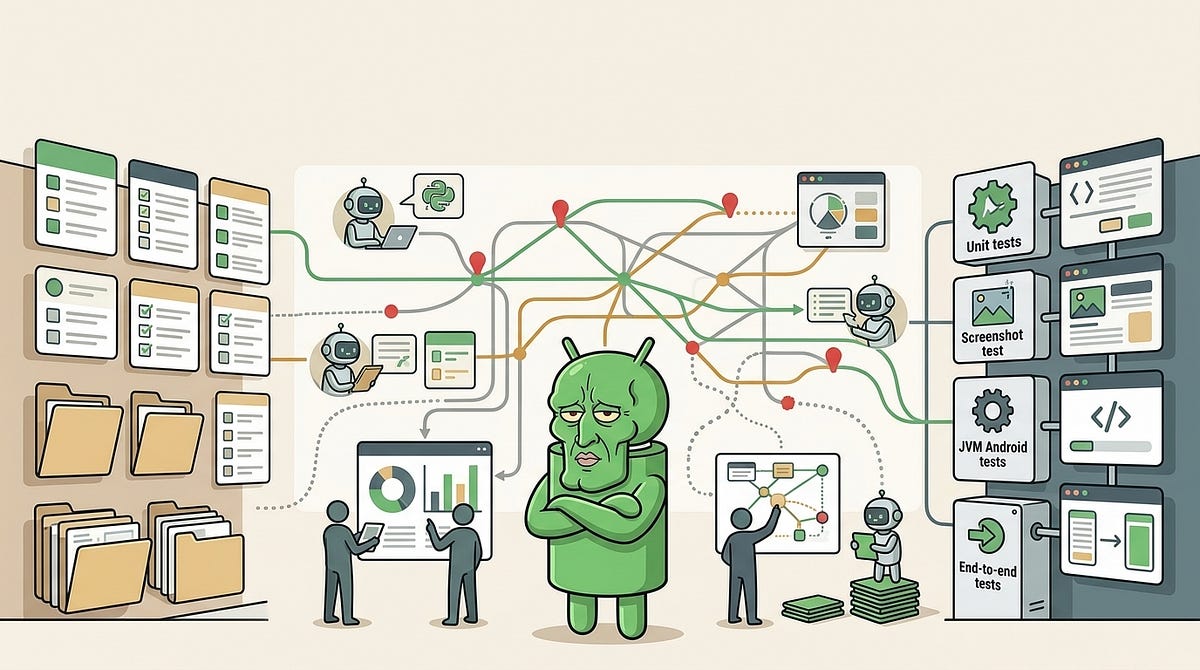
Manual testing has a way of growing quietly.
At first, it is manageable. A few regression checks here, a few release checks there, and enough shared knowledge in the team to know what really needs attention. But as the application grows, the cost starts to show. QA spends more time repeating checks that may already be covered somewhere in automation, developers add tests that are hard to connect back to real test cases, and nobody has a simple answer to the question that actually matters:
Can this manual test be skipped with confidence?
That was the problem I wanted to solve.
We already had automated tests. We also needed more of them. But the missing piece was not only test coverage. It was traceability, confidence, and a workflow that QA could use without needing deep Android testing experience.
So I started building a QA agent workflow around the testing process.
Not an agent that magically understands the whole codebase. Not a replacement for QA. More like a structured layer of documentation, mappings, reports, and prompts that helps humans and coding assistants work from the same source of truth.
The Problem Was Not Just Missing Tests
When people talk about reducing manual testing, the conversation often jumps straight to automation.
Write more tests. Run more tests in CI. Add more end-to-end coverage. Make the regression suite bigger.
All of that can help, but it does not solve the whole problem.
The harder problem is trust.
QA may have a manual test case that describes a real business scenario. Somewhere else in the codebase, there may be a unit test, a screenshot test, or a heavier UI test that covers part of the same behavior. But if nobody can clearly connect those two things, QA cannot safely skip the manual test.
From QA’s point of view, an unmapped automated test might as well not exist.
This is where automated testing can become strangely inefficient. Developers know tests exist, QA knows manual cases exist, but the relationship between them is not obvious enough to change release behavior.
So the goal became less about simply adding tests and more about answering a better question:
What evidence do we have for this manual case, and is that evidence strong enough to reduce manual effort?
Existing Automation Was Useful, But Not Usable Enough
The project already had multiple layers of tests. Some were fast and close to the code. Some checked rendered UI states. Some exercised Android behavior on the JVM. Some were closer to full end-to-end coverage.
That variety was useful, but it also created ambiguity.
A passing unit test does not prove the same thing as a passing end-to-end test. A screenshot test may be excellent for visual state, but it does not necessarily prove a backend handoff. A Robolectric-style JVM Android test can exercise screen behavior without launching a real device, but it still may not prove hardware, network, or production environment behavior.
For developers, this distinction is usually obvious. For QA, it is unfair to expect that level of Android testing context for every feature area.
The test report might say that everything passed, but QA still needed a more practical answer:
- Which manual cases are covered directly?
- Which ones only have adjacent coverage?
- Which ones are still missing automation?
- Which ones failed?
- Which ones should still be executed manually?
That is a different kind of report from a normal test result.
It is not just pass or fail. It is confidence, traceability, and risk.
Building a Workflow Layer Around Testing
The idea I landed on was to build a workflow layer around the existing test setup.
This was not a new test framework. It was not a magic AI system. It was mostly documentation, mappings, reports, and prompt structure.
The workflow had a few responsibilities:
- Describe how tests should be written.
- Map manual cases to internal scenarios.
- Classify the strength of the automation evidence.
- Generate reports for both developers and QA
- Produce prompts that QA could give to a coding assistant or agent.
- Keep the agent focused on the cheapest reliable test first.
The important part was that all of these pieces worked together.
Documentation on its own gets ignored. Reports without source mappings become hard to trust. Agent prompts without rules drift over time. Test mappings without confidence notes become another maintenance burden.
But when they are connected, the workflow starts to become useful.
QA can start from a manual case, see what automation already exists, understand what is missing, and use a pre-built prompt to ask a coding agent to write the next useful test.
Developers can start from a code change, see the likely testing impact, run a smaller useful scope, and understand where the regression risk still sits.
The same system supports both workflows, but it does not give both groups the same report.
That distinction matters.
The Workflow In Practice
The workflow became easier to reason about once it had a clear path from manual case to automated evidence.
In a simplified form, it looked like this:
That sequence is deliberately boring.
The point was not to make QA learn the structure of the Android project. The point was to let QA start from the thing they already understood, the manual test case, and move toward the next useful automation step without needing to reverse-engineer the codebase.
It also gave developers a clearer path. If a code change affected a risky area, the workflow could recommend the smallest useful test scope first rather than pushing everyone straight into a full regression run.
The useful part was the loop:
- Understand the current evidence.
- Add or improve the cheapest useful test.
- Update the mapping.
- Re-run the relevant scope.
- Re-check the confidence.
That made progress visible in smaller steps.
Keeping Source Data Separate From Generated Reports
One rule that became important early was separating authored testing knowledge from generated output.
The stable source of truth was the curated testing configuration: scenario mappings, trust policy, prompt rules, and confidence notes. Reports and imported case records were generated locally from that source data and from manual test case exports.
That separation prevented generated files from becoming another thing people had to maintain by hand.
It also made the workflow safer. If a report looked wrong, the fix was not to edit the report. The fix was to update the mapping, refresh the imported case data, adjust the trust rule, or improve the test itself.
The trade-off is that local generated data can become stale.
If a QA export has not been refreshed, the missing-tests queue may be working from old case details. If a developer has not generated the local case records on their machine, the prompt may need to fall back to the shared scenario mapping. That is not a reason to commit generated files everywhere. It just means refresh steps need to be explicit.
This was one of the less exciting parts of the workflow, but it mattered.
Reports are only useful when people understand what is authored source, what is generated output, and where to fix problems when the two disagree.
Confidence Is More Useful Than Existence
One of the biggest shifts was moving away from a simple idea of “does a test exist?”.
That question is too weak.
A test can exist and still not prove the manual case. It can cover a helper function but not the screen flow. It can check the happy path but not the failure state. It can be mapped to the right feature but not to the specific business scenario QA needs to release.
So the workflow uses confidence-style buckets instead.
The exact names are not important, but the concept is:
- trusted: strong current evidence exists. QA can usually skip the manual check.
- review: useful automation exists, but the evidence needs inspection before skipping.
- manual: current evidence is not strong enough. Run the case manually.
- failed: matching automation ran and failed. Investigate before trusting release confidence.
- not-tested: the scenario exists, but was not exercised. Run the relevant scope.
- unmapped: the manual case is not linked to a scenario. Map it first.
This makes the report more honest.
It avoids treating every passing test as equal. It also avoids hiding uncertainty. If the automation covers most of the scenario but still misses the real device handoff, the report should say that. If the case is only partially covered by nearby tests, that should not be presented as full confidence.
One important nuance is that confidence is not code coverage.
It is not a line percentage. It is a practical judgement about how much release risk the current evidence reduces for a specific scenario. That judgement can be informed by test results, mappings, historical failures, and remaining caveats, but it should not pretend to be more precise than it is.
That sounds obvious, but it is easy to get wrong when the goal is to show progress.
The workflow had to be strict about not overstating coverage. A slightly pessimistic report is much more useful than an optimistic one that causes QA to skip something important.
Choosing the Cheapest Reliable Test First
Another rule was to avoid jumping straight to the heaviest test layer.
End-to-end tests are valuable, but they are also expensive. They take longer to write, longer to run, and usually require more maintenance. If the risk can be covered by a cheaper test, that should be the first option.
The rough order looked like this:
- Unit tests for pure logic.
- Screenshot tests for visual states.
- Robolectric-style JVM Android tests for screen or process behavior.
- End-to-end tests when the real risk needs a full system path.
This is not a universal rule for every project, but the principle is useful.
Use the lowest-cost layer that gives enough confidence.
If a manual test is mostly checking validation logic, a unit test may be enough. If it is checking a specific empty state or error dialog, a screenshot test may be better. If it depends on Activity behavior, navigation, or Android framework interaction, a JVM Android test may be more appropriate. If the real risk is a device, backend, scanner, payment terminal, or cross-application flow, then a heavier end-to-end test might be justified.
Screenshot tests had one extra caveat.
They are useful, but I did not want the report to treat a screenshot as automatic approval. A screenshot diff can show that the UI changed, and it can be a very good review artifact, but a human may still need to decide whether the new rendering is correct.
The workflow does not try to make everything cheap. It tries to make the trade-off explicit.
That is especially helpful when a coding agent is involved. Without guidance, an agent may choose a test layer that looks plausible but is either too shallow to be useful or too heavy for the problem.
The prompt needs to steer it toward the right level.
Mapping Manual Cases to Automated Evidence
The next step was traceability.
Manual cases usually live in an issue tracker or test-management tool. Automated tests live in the codebase. Reports live somewhere else again. If those worlds are not connected, QA has to do the matching manually.
That matching is exactly the kind of work the system should reduce.
The workflow imports manual test case data, turns it into local case records, and maps those cases to internal testing scenarios. Those scenarios can then be linked to existing automated tests, adjacent coverage, confidence notes, and recommended next layers.
The result is a more useful testing queue.
Instead of a vague statement like “we need more tests”, QA can see something closer to:
- This case has direct coverage and can usually be trusted.
- This case has adjacent coverage but still needs a scenario-level test.
- This case has no meaningful automation yet.
- This case is mapped, but the latest test run did not exercise it.
- This case is not mapped to any scenario, so it needs triage first.
That distinction changes the conversation.
It lets QA focus on the cases that still need human attention. It lets developers see which automation would have the highest value. It also gives coding agents a clearer target than “add tests for this feature”.
Giving QA Agent-Ready Prompts
One of the more useful parts of the workflow was generating prompts that QA could use directly.
The prompt does not need to be long. In fact, the case-specific part should be short. The stable rules should live in shared documentation, and the prompt should point the agent to those rules.
A useful prompt contains just enough context:
- The manual case id.
- The mapped internal scenario.
- The local case file or source record.
- The recommended test layer.
- Nearby tests to mirror.
- Any case-specific hints.
- A reminder to update mappings and confidence notes if coverage changes.
The key is that QA does not have to know how to write the perfect coding-agent prompt. They start from the generated queue, copy the suggested prompt, and give it to whichever coding assistant they are using.
A version of a generated prompt might look like this:
The agent is then expected to read the testing guidance, inspect nearby tests, follow the existing style, write the cheapest reliable test, and report what confidence changed.
That last part is important.
The output should not just be “I added a test”. It should say what layer was added, what is now covered, what remains unproven, and whether the confidence is actually strong enough for QA to rely on.
For example, a version of the metadata might look something like this:
The exact format is not the point. The point is that the confidence and caveat are captured next to the scenario, instead of being left in a chat message that disappears.
The Guardrails Matter More Than the Prompt
Coding agents are helpful, but they are not consistent by default.
They can forget instructions. They can write a test that matches the screen but not the business rule. They can choose a heavier layer than needed. They can overstate confidence. They can miss a mapping update. They can invent new test structure instead of following the local style.
That does not make them useless. It just means the workflow needs guardrails.
The stable instructions tell the agent to do a few things before writing tests:
- Read the testing workflow documentation.
- Read the target manual case.
- Check nearby existing tests.
- Match local patterns and helpers.
- Prefer the cheapest reliable test layer.
- Keep traceability to the case or scenario explicit.
And after writing tests:
- State what was added.
- Give a short confidence estimate.
- Explain the remaining caveat.
- Update the scenario mapping if coverage changed.
- Avoid claiming full confidence unless the evidence supports it.
- Suggest the next best improvement if confidence is still not high enough.
This is where the workflow becomes less about AI and more about process design.
The prompt is only the entry point. The repeatable rules, reports, and mappings are what make the result useful.
What The Agent Still Got Wrong
This workflow helped, but it did not make coding agents perfect.
The common failure modes were predictable:
- Writing a test around the screen shell instead of the business steps.
- Choosing a broader test layer than the case really needed.
- Forgetting to update the scenario mapping after adding coverage.
- Treating “a test was added” as “confidence is now complete”.
- Missing the remaining caveat when real device, backend, or external-system behavior was still unproven.
- Creating new helper structure instead of following nearby tests.
Those mistakes are why the workflow kept repeating the same rules in a few places.
Check nearby tests. Use the cheapest reliable layer. Keep traceability explicit. Do not overstate confidence. Say what still needs manual or broader verification.
Repetition can feel annoying in documentation, but with coding agents it is often necessary. The model may follow most of the instruction and still miss the one rule that matters for the current case.
The goal was not to make the agent autonomous. The goal was to make its output easier for QA and developers to review.
Developers and QA Need Different Reports
Another lesson was that one report cannot serve everyone well.
Developers and QA ask different questions.
A developer working on a change usually wants to know:
- What broke?
- What should I run?
- What is the smallest useful test scope?
- What regression risk remains?
- What tests should I write next?
- Is there a production-code change that would make this easier to test?
QA usually wants to know:
- Which manual cases can be trusted?
- Which cases need review?
- Which cases are still manual?
- Which mapped tests failed?
- Which cases are missing automation?
- Which cases are unmapped?
- What should be automated next?
Those are related questions, but they are not the same report.
If the QA report is too developer-focused, it becomes noisy. If the developer report is too QA-focused, it slows down the code-change loop. Splitting them keeps each workflow clearer.
The developer report can focus on fast feedback and regression risk. The QA report can focus on trust, missing coverage, and manual testing decisions.
The Maintenance Loop
The mapping was not a one-time task.
Tests get renamed, deleted, moved, or retargeted. Manual cases change. New scenarios are added. Old assumptions become stale.
If the system does not make that visible, the reports slowly lose value.
So maintenance had to be part of the workflow rather than a separate cleanup project. When a test changed coverage, the mapping needed to change with it. When confidence changed, the confidence note needed to be updated. When a report showed unmapped cases, those needed to be triaged instead of ignored.
This is also where audits helped.
They gave the team a way to check whether the current test classes still lined up with the scenario inventory. That does not replace human judgement, but it does catch the kind of drift that makes QA stop trusting reports.
The workflow only works if the map stays close to the territory.
What Changed
The biggest change was not that manual testing disappeared.
It did not, and that was never the goal.
The useful change was that manual testing became more targeted.
QA could see which cases had strong evidence and which ones still needed attention. Developers could see which tests would reduce the most risk. Coding agents had better prompts and clearer boundaries. The team had a shared language for coverage that went beyond pass or fail.
The workflow also made missing tests easier to discuss.
Instead of saying “we need more automation”, the report could point to specific mapped cases, recommended layers, and nearby tests to mirror. That makes the next step smaller and more actionable.
It also helped with confidence over time.
When a new test was added, the mapping and confidence note could be updated with it. When a test was renamed or removed, the mapping could be audited. When a case remained manual, the reason could be stated clearly instead of being implied.
That visibility is valuable.
The Caveats
This kind of workflow is not free.
Mappings need maintenance. Trust rules need tuning. Reports are only useful if the source data stays clean. Agents still need review. Some tests will still be too expensive to automate properly. Some scenarios will always need a real device, real backend, or human judgement.
There is also a risk of making the system sound more certain than it is.
That is why the confidence model matters. If the current evidence is weak, the report should say so. If the test only covers the local UI state, it should not claim to prove the full end-to-end flow. If a case is unmapped, it should be visible rather than silently ignored.
The workflow should reduce manual burden, not hide risk.
That is the balance I kept coming back to.
Final Thoughts
The most useful part of this work was not the scripts, the reports, or the prompts on their own.
It was connecting them into a workflow that answered a practical QA question:
Can this manual test be skipped with confidence?
Sometimes the answer is yes. Sometimes the answer is no. Often the answer is somewhere in the middle: there is useful automation, but one important caveat remains.
That honesty is what makes the system useful.
Coding agents can help write tests, but they need structure. QA can use automation more confidently, but they need traceability. Developers can reduce regression risk faster, but they need clear feedback about what matters.
The goal was never to remove people from the testing process.
It was to remove some of the repeated, low-value manual work by making automated evidence easier to find, easier to improve, and easier to trust.
And for a growing Android project, that can make a real difference.