
Speeding up your build pipeline isn’t just about faster Gradle builds, though that’s a great place to start. I covered that part in a previous article, where I focused on cutting down Gradle build times directly. That alone gave us a solid boost.
But faster builds aren’t only about saving time, they’re about faster feedback. The quicker your CI pipeline runs, the sooner you know if something broke. That’s not just a convenience; it directly affects how you work. When feedback takes too long, devs end up waiting, context-switching, and losing momentum. On the flip side, quicker pipelines mean faster fixes, fewer merge conflicts, and more confident changes. It improves both your speed and your flow.
So what happens after your Gradle tweaks are done and you’re still waiting around?
This article is all about that. These tips aren’t just Gradle tricks, they’re changes that often fly under the radar until you start poking at your CI config, cache behaviour, and job timings. If your builds still feel slow even after streamlining Gradle, this one’s for you.
One Size Doesn’t Fit All
First, a quick heads-up: CI/CD setups aren’t one-size-fits-all. While platforms like GitHub Actions, GitLab, and Bitrise all follow similar patterns, they each have their quirks. The examples in this post are based on GitLab CI, but the logic applies anywhere. You’ll just need to adapt the syntax for your platform.
Document the changes
Whatever you try, track your changes. Don’t just run the pipeline once and call it a win. Build times can vary run to run, so test each change a few times. Keep notes on what you changed, what you expected, and what the actual results were.
Yeah, it means some waiting around, but you don’t have to babysit the terminal. Try out a few tweaks across the day and let the results roll in. I used a markdown file like the one below to keep track: simple, effective, and easy to share with the team.
Why I’m Skipping Caching (Mostly)
Caching is usually the first thing people reach for and rightly so. It can shave serious time off your builds. But in our case, we were working with a self-hosted GitLab instance that made proper caching… tricky. The infrastructure just didn’t play nice with persistent cache storage.
So I looked for other wins that didn’t depend on platform-level support or stable shared storage. If you can set up caching properly, go for it, just know that everything in this article works even if you can’t.
(That said, here are the docs if you can: GitLab, GitHub, Bitrise)
Simplifying Stages for Real Speed
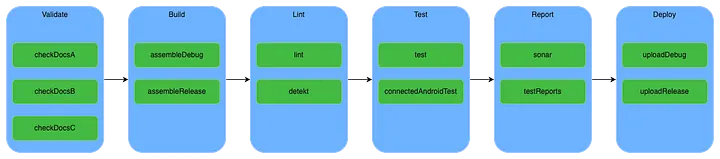
Our original pipeline had six stages: documentation, build, lint, test, report, and deploy. Sounds neat on paper, but in practice, each stage waited for the one before it. That meant if your doc job failed, you'd never even reach the tests. Not ideal.
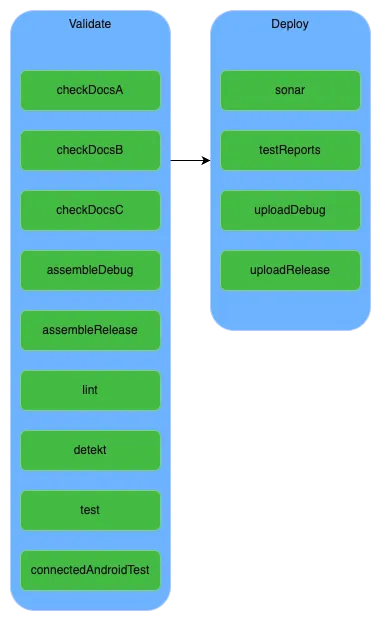
We collapsed everything into just two stages: validate and deploy. Then we used only: and except: to run jobs conditionally. Reporting only ran on main, and docs were skipped completely in that branch.
assemble
  except:
    - dev
    - main
report
only:
- devThat one change took our pipeline from 12 minutes to 6 with no loss in coverage or visibility.
Delaying Jobs to Beat the Cache
Here’s some outside-the-box thinking.
Since we couldn’t use a shared cache across all jobs, every job was doing a clean Gradle build. That meant downloading Gradle each time, which slowed us down, especially for the longest job, which ran over 4 minutes on its own.
Eventually we enabled local caching with policy: pull/push, but only after one job fetched Gradle first.
default:
  image: …
  before_script: …
  cache:
    key: cache123
    paths: …
    policy: pull
The problem? All jobs ran in parallel. So they all started cold, none got the cache in time.
So I picked the fastest job and added a delay to the others using start_in: 10 seconds. That gave the fast job time to download Gradle and cache it for the rest. It’s a hack, but it worked.
assemble:
  interruptible: true
  stage: validate
  except: …
  script: …
  when: delayed
  start_in: 10 seconds # wait to allow the quickest job to download gradle and cache it
  artifacts: …
We consistently saved around 1 minute per pipeline, and the team agreed it was worth the weirdness.
Running Tests in Parallel
Running tests in parallel is one of the easiest wins if you’re not doing it already.
For unit tests, it’s as simple as:
Adding this configuration to your gradle.properties
org.gradle.parallel=trueAdding this task to your build.gradle.kts file
tasks.withType<Test> {
    maxParallelForks = Runtime.getRuntime().availableProcessors()
}
For instrumented tests, it depends on your setup, but Android Studio supports running them on multiple devices in parallel. Check out this guide for more on that.
Other Quick Wins
- Commit more frequently. I know this sounds like the opposite of what we’ve been told. But more commits mean more chances to catch issues early. For fast pipelines, it works well.
- Increase your container resources. Most platforms let you scale your runners. GitHub has larger runners, GitLab offers upgrades, and Bitrise lets you buy more capacity.
Sometimes more CPU is the cheapest fix.
Conclusion
For the project I worked on, the biggest win came from simplifying our pipeline stages, cutting build time by roughly 50%. The strange little delay trick? That saved another 10%.
None of it was rocket science, but it did take testing, tweaking, and some creativity. Try different ideas. Measure your results. And don’t be afraid to do something that looks weird if it shaves minutes off your build.
Just make sure you document it. A simple form of documentation can be the difference between guesswork and progress.